1. How to disable the comments to your files?
2. How to allow placing anonymous comments to your files?
3. How to start getting e-mail notifications about the new comments?
2. How to allow placing anonymous comments to your files?
3. How to start getting e-mail notifications about the new comments?
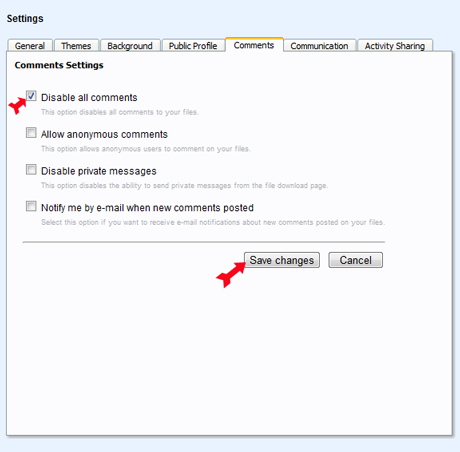
How to disable the comments to your files?
- Click on “Settings” in the upper menu of your account at 4shared;

- Open “Comments” tab;
- Put a tick near the “Disable all comments” option and click on “Save changes”.
How to allow placing anonymous comments to your files?
- Click on “Settings” in the upper menu of your account at 4shared;
- Open “Comments” tab;
- Put a tick near the “Allow anonymous comments” option and click on “Save changes”.
How to start getting e-mail notifications about the new comments?
- Click on “Settings” in the upper menu of your account at 4shared;
- Open “Comments” tab;
- Put a tick near the “Notify me by e-mail when new comments posted” option and click on “Save changes”.
Testimonials:

Paul, 22
“ Most of files that I keep at my 4shared account are the photos of my art works, and I’m glad, when people decide to leave their feedback, share their opinion about my art. Now that I’ve switched on the e-mail notifications about the new comments to my photos, I can browse what people are saying about my work faster.”
“ Most of files that I keep at my 4shared account are the photos of my art works, and I’m glad, when people decide to leave their feedback, share their opinion about my art. Now that I’ve switched on the e-mail notifications about the new comments to my photos, I can browse what people are saying about my work faster.”

Mary, 50
“ As I keep only my private files, like daily to-do lists, documents and some family photos at my 4shared account, I find the option to disable any comments to my files unbelievably useful. I’m just not interested in others’ opinions in this respect.”
“ As I keep only my private files, like daily to-do lists, documents and some family photos at my 4shared account, I find the option to disable any comments to my files unbelievably useful. I’m just not interested in others’ opinions in this respect.”